
- Category or brand intent is clear
- Live listing still opens for the same item
- Colour / size / batch notes match what you want
- QC photos, if any, show that exact option
- Price is a snapshot — confirm the current quote
CHECKLIST · HANDOFF · COMPARISONS · NOT A FEE REVIEW
How to use this TigBuy spreadsheet.
One place for the buying path, listing checks, TigBuy link steps, jacket, hoodie, sweater and boot comparisons. Product links stay on the spreadsheet; outfit notes live on the blog.
- DiscoverStart from Categories or the spreadsheet shortlist.
- VerifyOpen the listing and match colour, size and item ID.
- Review QCTreat snapshot counts as dated; match photos to the variant.
- DecideOnly then look for a TigBuy handoff on the destination page.
Start with the process
Looking for outfit notes? Blog ↗START HEREHow to use the spreadsheetQUICK CHECKSBefore you treat a row as order-ready
Filter finds, save a shortlist, download CSV, then check size, price, QC and the TigBuy link steps on the listing.
Open checklist ↓FIELD CHECKReal order notes (pending)First logged purchase will use the cream crewneck worked example. Until then this block stays marked pending.
Open field check ↓Compare before you filter
Browse all categories ↗OUTERWEAR · 94 FINDSJacket comparison
Bomber, puffer, coat, blazer, vest and everyday jacket, with layering checks.
Compare jackets →HOODIES · 26 FINDSHoodie comparisonPlain, graphic, zip-up and crew sweatshirts, with openings and fit checks.
Compare hoodies →SWEATERS · 48 FINDSKnitwear comparisonCrewnecks, a quarter zip and a cardigan, with layering combinations and measurement checks.
Compare knits →BOOTS · 18 FINDSBoots comparisonLace-ups, short boots and heeled shapes, with CNY price snapshots, pairing notes and size checks.
Compare boots →FIND → SPECIFY → HANDOFF · NOT A FEE REVIEW
How to use a TigBuy spreadsheet.
From find to listing check.
A spreadsheet is a list of product links, not an order confirmation. Use this page to move from a shortlist to one clearly identified option — then verify the live listing before any purchase.
This section covers discovery and listing checks on Tig Finds. Order payment, warehouse QC and shipping happen on TigBuy or another buying service — we do not publish fee tables here.
Open the spreadsheet →The route from a find to a parcel
Know what “done” means at each stage. On this site, finish Find and Specify before you leave for a buying platform.
| Stage | Your action | What you should have afterwards | Where |
|---|---|---|---|
| Find | Browse a category or search, then open a product. | A live page for the item you want. | This site |
| Specify | Confirm colour, size, quantity and measurements. | One clearly identified option + notes. | This site + listing |
| Order | Submit the product or marketplace link and review the quote. | Order reference and cost breakdown. | Buying service |
| Warehouse | Match arrivals to your option and review QC for that variant. | A keep / ask / reject decision per item. | Buying service |
| Ship | Choose ready items, packaging and an eligible route. | Confirmed parcel contents and charges. | Buying service |
| Receive | Compare delivery with the parcel record. | Complete order or evidence of an issue. | You |
Prices and QC counts on Tig Finds are dated API snapshots. They are not live stock, total delivered cost, or a quality rating.
From a product list to a shortlist
1. Narrow the list
Choose a category first. Add a brand or colour if you know what you want. Card view is easier for browsing photos; table view puts the product notes side by side. Clear a filter if the combination returns no results.
2. Save or download your shortlist
The bookmark button saves a find on this device. “Saved only” shows that shortlist. “Download visible finds” exports the current filtered list as a CSV with names, colours, notes, product links and any cached price and QC data. The checked date tells you when that snapshot was fetched; confirm current details on the listing.
3. Find your buying platform on the product page
Use the product name or “View product” link to open the matching listing. Where available, open “Compare platforms” and look for TigBuy. Use its product-link option, then confirm which site opens. The catalogue URL itself is not an original marketplace URL.
4. Recheck the item after the handoff
Confirm the item, colour, size and current price on the buying platform. For clothes, compare the size chart with a garment that fits; for boots, check the chart and quoted insole measurements. QC totals on a catalogue page may include other colours or photo sources. A photo from a different variant is not a substitute.
Work through one item before a large shortlist
Suppose you want a plain cream knit. Open Sweaters & knits, then the Cream ribbed crewneck sweater.
- Confirm the listing still shows a cream / off-white option — not only a nearby colour in the photo grid.
- Compare the size chart with a sweater you already wear. If chest or length is missing, mark it unknown before choosing a size letter.
- Read the sheet QC snapshot (0 in snapshot), then open the live product page. On a re-check dated 29 Oct 2026, this cream crewneck still showed 0 in snapshot here while the destination listing showed a 37 QC photos control and a Compare platforms button — proof that a zero snapshot is not an empty listing.
- Fill the item record below. Match any QC album to cream / off-white only, then look for a TigBuy option under Compare platforms where available.
This example uses a real row from our list and a dated live re-check. It is not a hands-on product review or a guarantee that those photo counts stay the same.
Prefer to compare all 48 sweaters first? Open the knitwear guide ↗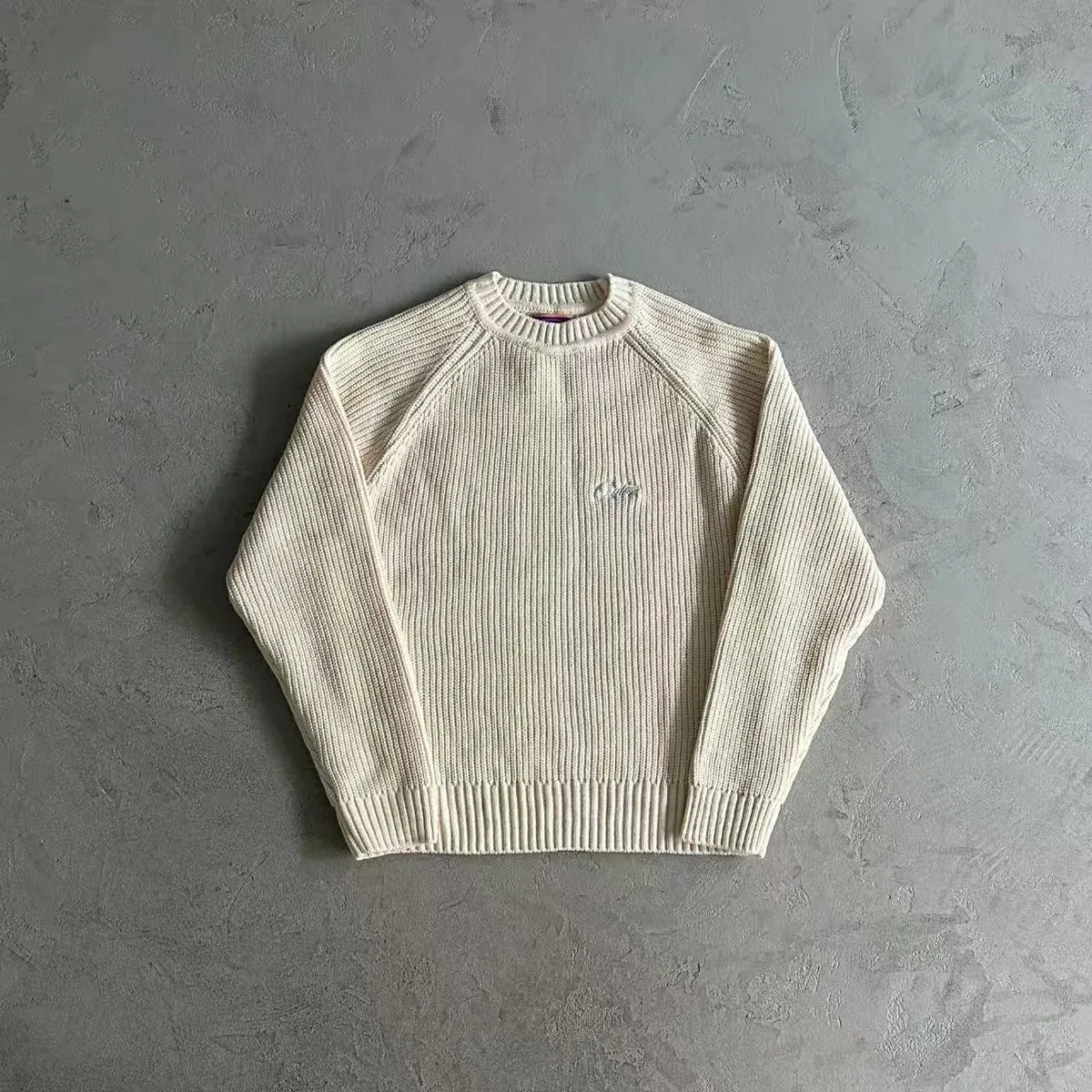
Field check from a real order
Listing re-checks are useful. A logged purchase is stronger. This section stays honest about what has — and has not — been ordered yet.
FIELD CHECK · PENDING
Cream ribbed crewneck sweater
No purchase logged yet. Baseline listing facts are filled; order outcomes stay empty until a real buy is recorded.
Guides worked example. On 29 Oct 2026 the sheet still showed 0 QC while the live listing showed a 37 QC photos control and Compare platforms — the clearest first path to test find → specify → handoff → warehouse QC.
Baseline already on file
- Sheet QC0 in snapshot
- Listing re-check37 QC photos control visible (29 Oct 2026)
- Price snapshotCNY ¥198 (dated API pull — confirm live)
No purchase logged. Baseline listing re-check is done; order + warehouse notes are still empty on purpose.
- FindSheet row + live listing open
- SpecifyColour target = cream; size still to measure
- OrderNo buying-service order logged
- Warehouse QCWaiting on a real order
- Fit / keepWaiting on arrival notes
- Confirm cream / off-white is still the option on the live listing
- Copy chest / body / sleeve from the chart against a sweater you already wear
- Order via one buying service and write the service name + order date here
- When warehouse QC arrives: match photos to cream + that size only
- After arrival (or QC decision): fit vs expected, keep / return, 2–3 lessons
Send results to fill data/field-checks.mjs: order date, buying service, size, warehouse QC summary, fit, keep/return, lessons. We rebuild after a real log — we do not invent outcomes for SEO.
Keep the link and chosen option together
A category or search link is not an exact product reference. Keep the catalogue URL, any original marketplace URL, the option you chose and open questions in one place. Leave unknowns marked as unknown rather than guessing.
Product and seller: Cream ribbed crewneck sweater / Unspecified brand
Catalogue product URL: https://the product catalogue.com/en/p/champion-reverse-weave-crewneck-sweater-in-cream-120117
Original marketplace product URL: [unknown until shown on the listing]
Version / colour / size / quantity: Cream / [size] / 1
Size-chart measurements and units: [fill from listing, or mark unknown]
Item price / currency / domestic postage: CNY ¥198 / [postage unknown]
QC reference and matching option: 0 in snapshot — confirm exact colour/size
Questions to resolve: original marketplace URL; size chart; current stock
Last checked: 2026-10-30
Blank fields are intentional. Fill them from the live listing on the day you check — do not treat the pre-filled snapshot price or QC line as final.
FROM THE LIST TO A BUYING PLATFORM
Using the TigBuy option.
Our product links open a catalogue page. On that page, look for the controls by name — do not stop at the sheet snapshot.
- 01
Match the product.
Check the title, main photo and chosen colour. A listing may group several colours or related styles under one product.
- 02
Read QC on the listing, not only on this sheet.
Open the QC photos control when it appears. Counts on the destination page can be higher than our dated API snapshot. Match albums to the exact colour and size you will order.
- 03
Open Compare platforms.
Look for “Compare platforms”, then TigBuy and its product-link option. Use an original marketplace link if your buying service requires one.
- 04
Check the page you reach.
Confirm the destination, item, colour, size and price again. Do not assume that selections carry over between sites.
The catalogue URL is not an original marketplace URL. If the platform option does not open a usable listing, check the source link before ordering. The final external handoff has not been verified end-to-end on every find.
What to check on the product listing
Scroll sideways for all columns →
| Check | Look for | Do not assume |
|---|---|---|
| Item and variant | Matching title, colour, size and the source item identifier. | That every photo refers to the colour you selected. |
| Clothing fit | Chest, body and sleeve length; waist, rise and inseam for trousers. | That the same size letter fits the same way across listings. |
| Price and availability | The current item price, currency and available variant. | That an exported list keeps prices or stock up to date. |
| QC photos, when available | The exact item and option, visible construction and measurement references. | That catalogue photos are warehouse QC photos. |
Common questions
Is this a Google Sheet?
No. Browse here or download CSV, then import into Sheets/Excel if you want.
Where do product links go?
To the matching external product listing. We are independent of TigBuy.
I need a Taobao / Weidian / 1688 link
Open the listing and look for a source URL. We do not invent marketplace links from slugs. Resolve the source before ordering.
Fees, warehouse days, shipping lines?
Not on this page. We cover find → specify → listing checks only.
QC or size help?
Read the QC and size-chart blog notes, then come back for the item record and handoff steps.
A link stopped working
Listings move. Keep the product name (and source ID if you have it), then re-check. Bookmarks and CSV rows do not reserve stock.
QC photo snapshots ↗ · Size chart checks ↗ · Jeans fit checks ↗ · Winter combinations ↗
Common questions
Is this official TigBuy?
No. Independent guide. Use it to shortlist, then verify the live listing yourself.
Guides or Spreadsheet first?
Spreadsheet = links, filters, CSV. Guides = buying path + jacket/sweater/boots comparisons. Find products on the sheet; learn the steps here.
Where are fees and shipping?
Not on this hub. We stay on find → specify → listing checks. Fee tables need a separate dated review.
Can these guides promise stock or QC quality?
No. Snapshots go stale. Confirm size, colour and photos on the destination page the day you order.
READY TO SHORTLIST?
Open the finds sheet
Guides explain the process. The spreadsheet holds the product links.
Browse the spreadsheet →